Salisbury Connect: Connecting People to Places.

Fast, flexible, on-demand rides are replacing Route 3 starting January 19.

701r2bwc_qr_code (1) logo

Scan to download

Ride FREE through February 2 when you book through the app.

Like a shared taxi, but better.

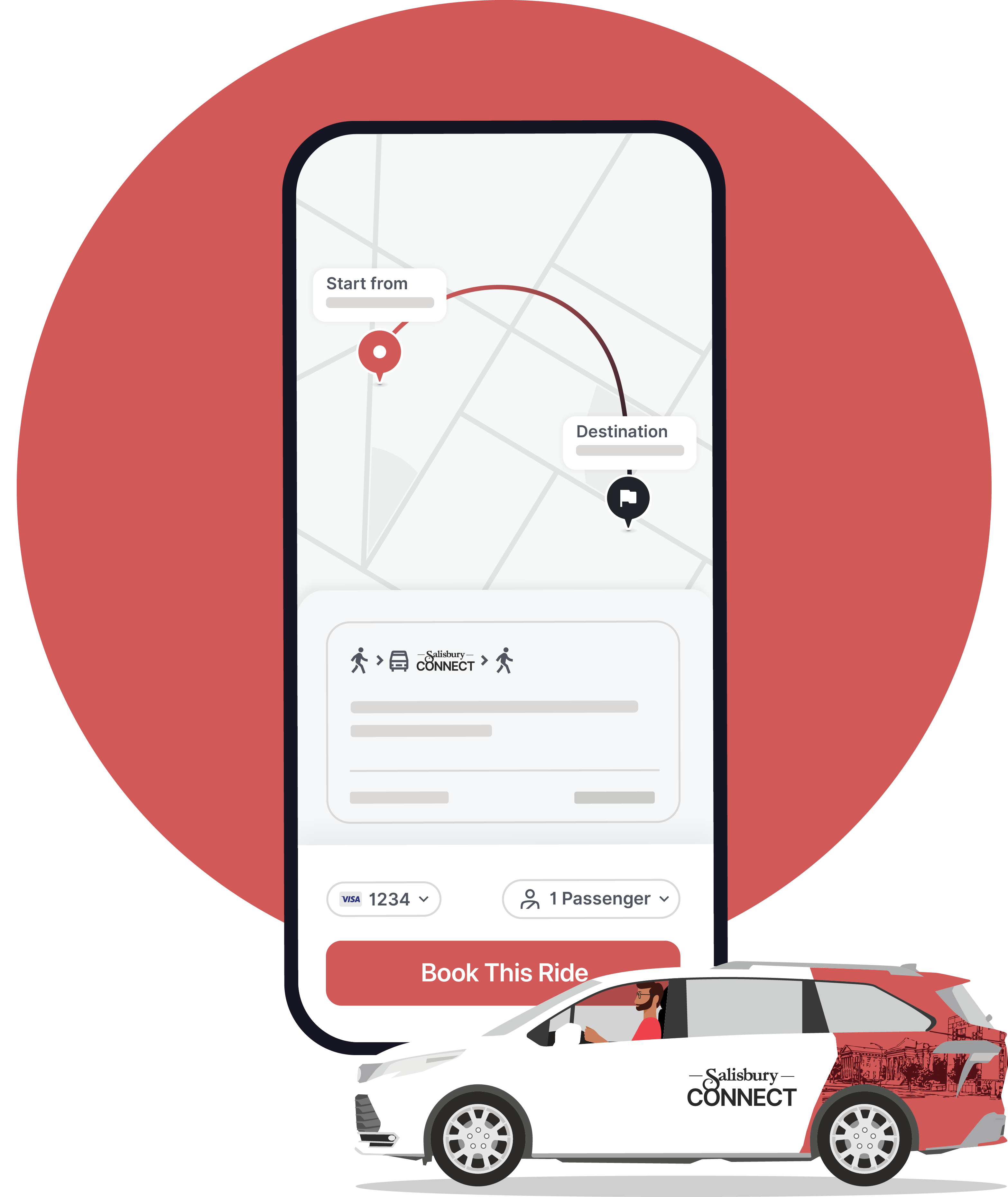
Salisbury Connect is an on-demand public rideshare service. Simply enter your pickup and dropoff locations, meet your driver at your door, and we’ll get you to your destination!

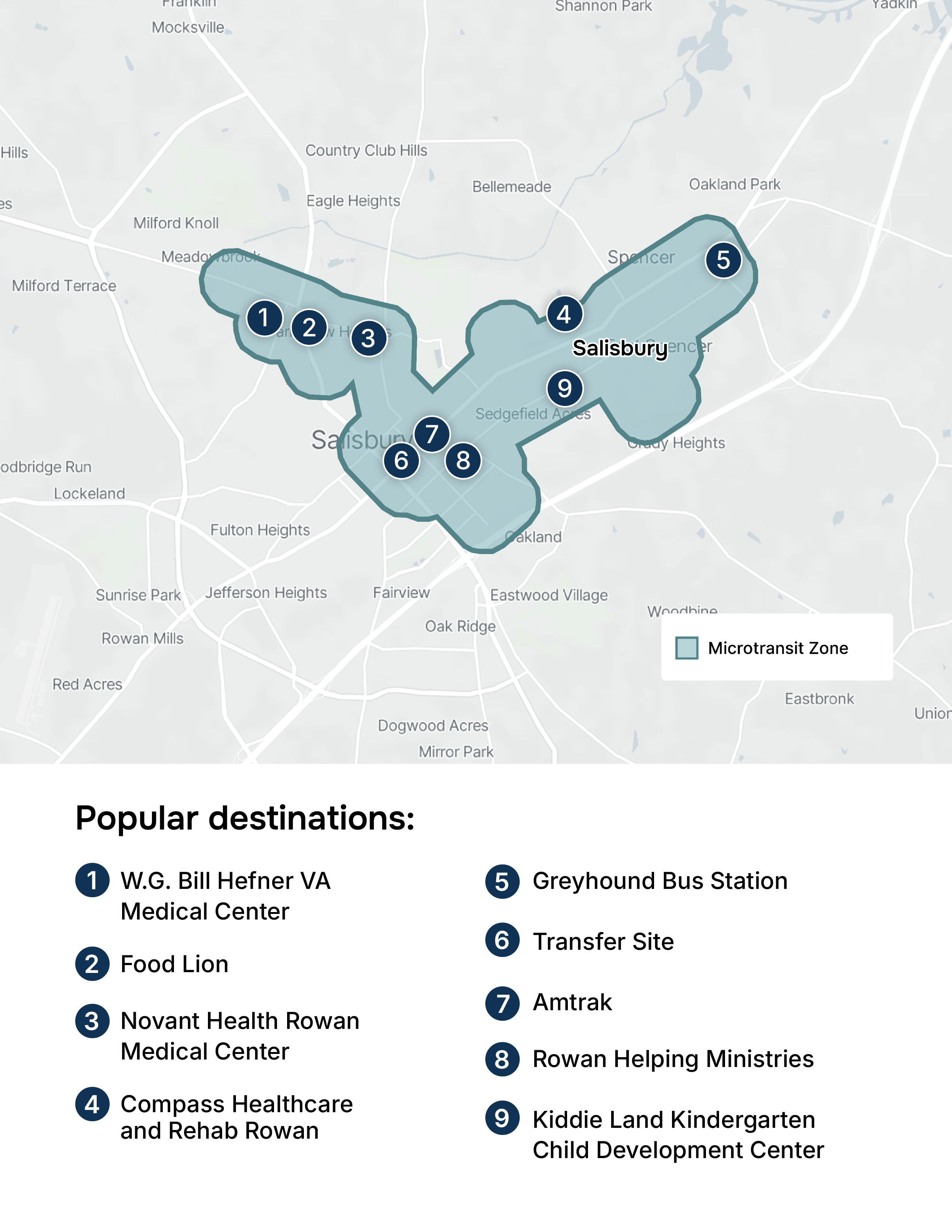
Salisbury Connect_Zone Map_POI2-1

Microtransit Zone

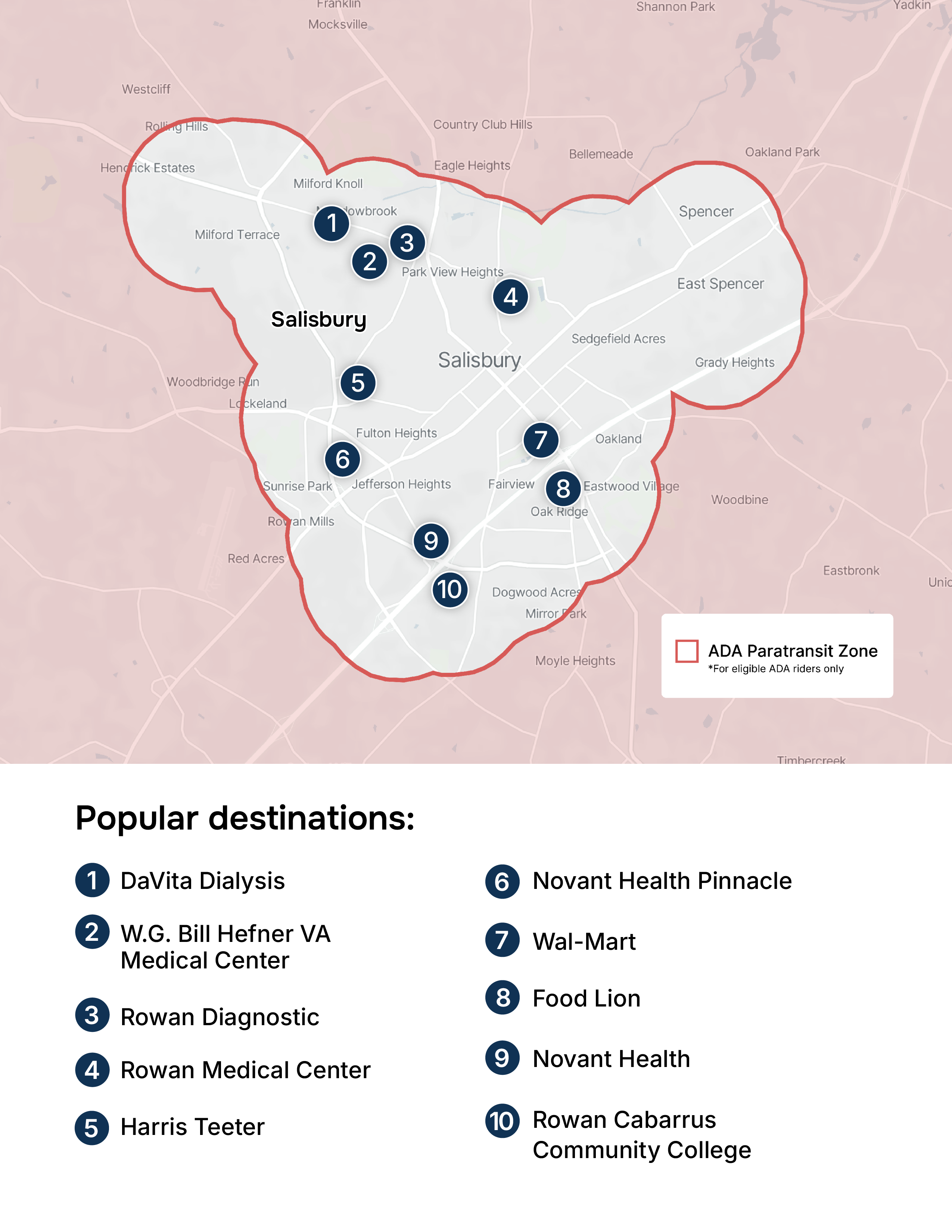
Salisbury Connect_Zone Map_POI

ADA Paratransit Zone

Price

Promotion fares of $1 or less for a limited time. $0.50 fares available for Medicare, seniors, students, and persons with disabilities. Children under 5 ride free.

Easy ways to pay

Add a credit/debit card to your account in the app, or pay with cash, transfer slips, or a punch pass on board.

Service hours

Monday – Friday: 6am – 7pm

Accessibility

Wheelchair accessible vehicles are available.

How to ride Salisbury Connect.

3 easy steps to get on board in no time.

Salisbury_Connect_HowToRide_anim_Step01

1. Create an account

Download the Salisbury Connect app from your preferred app store and follow the simple signup steps. 

47715155-0-app-store 47715150-0-play-store
Worcestershire_HowToRide_Still_Step02

2. Book a ride

Enter your pickup and dropoff address. Choose the ride that works for you by tapping Book This Ride.  

Worcestershire_HowToRide_Still_Step03

3. Meet your driver

Check out the app to find exactly where to meet the vehicle. 

No smartphone? No problem.
Book a ride by calling 704-228-7296.

Take your first ride today.

 Any questions?
Email us at [email protected].

Frequently Asked Questions

How does the service work?

What do the vehicles look like?

All vehicles are branded with the service’s logo and colors, similar to the graphic shown above, so they should be easy to spot.

What are the points of interest in the app?

These are locations we believe will be popular origins and destinations for rides. Select them to easily choose where you need to go to or from.

How do I request a wheelchair accessible vehicle (WAV?)
Two easy ways to update your accessibility setting:
  • In the app menu tap Accessibility, then complete the Accessibility Request form.
  • You can also call (704)-228-7296 for help updating your account.
Can I bring someone with me?

Sure! You can book rides for you and any additional passengers. All additional passengers will be charged according to the pricing section on this page and you will pay for all rides using the same payment method.

Can I bring a service animal with me?

Service animals are always welcome to ride without restriction. Driver have a legal obligation to provide service to riders with service animals. If you are a rider traveling with a service animal and wish to report any issue you experience related to your service animal, please send an email to our support team at the email listed above explaining the situation. 

Can I book rides without a smartphone?
The easiest way to use the service is by downloading the app with the links above. However, if you do not have a smartphone, or need additional assistance, you can call our support team at the number listed above and we’ll help you over the phone.

Account Information

How do I update my account information (phone number, name)?

Navigate to the menu in the top left corner of the app and tap your name at the top. Then tap your name, email or phone number to update it.

How do I reset my password?

Open the app and select 'Get Started.' In the password box, select 'Forgot your password?' and follow the prompts.

How do I add favorite addresses?

Navigate to the menu in the top left corner of the app and tap 'Favorites', then tap 'Set Home Address', 'Set Work Address', or create and name a new favorite. Once you have saved favorite addresses, they will appear as quick options on the home screen, making booking rides even easier!

How do I delete my account?

Navigate to the menu in the top left corner of the app and tap your name or profile picture at the top. Then tap ‘Delete my account’ at the bottom of the page. If you would like to request your data be deleted, you can email Downtowner's support team at [email protected].

Ride Information

Can I edit my pickup or dropoff location?

Once you start a ride, the destination cannot be changed. If you have not yet boarded the vehicle, you can cancel the ride and re-book with a new pickup or destination address.

Why can’t I request a ride?

Sometimes, if we are experiencing high demand in your area, there may not be any vehicles or drivers currently available to service your ride. If your travel plans are flexible, you can try requesting the ride again after a few minutes. Please note, calling will not increase your ability to book a ride as our agents have the same ability as you do booking in the app.

How do I know where and when to meet my driver?

Once a ride is confirmed, you will see the estimated time of arrival (ETA) of your driver in the app. You can follow your driver’s progress in real-time so you know where they are. 

What should I do if my driver leaves without me?

Re-book your ride directly in your app, and then please send an email to our support team at the email listed above explaining the situation. Rest assured, you will not be charged for rides you did not take.

How do I cancel my ride?

You can cancel your ride directly from the app or by calling our support team at the number listed above. Remember, canceling at the last minute can negatively impact other riders, so please cancel as soon you know that you don’t need a ride. 

How do I report an item I left behind in the vehicle?

Please send an email to our support team at the email listed above with a description of the missing item. We will do our best to track down the missing item and if found, will let you know where you can come pick it up.

Can I leave feedback for my driver?

Feel free to fill out the ride feedback screen in the app after your ride.

How do I report a complaint?

Please contact our support team at the email or phone number listed above to report a complaint. Be sure to include as much information as possible and we’ll do our best to help.

Payment information

How do I pay for my rides?

When creating an account, you’ll be prompted to add your credit or debit card information in the app. Other payment methods may be available and they are listed in the 'Easy ways to pay' section above. If you are paying by card, you will be charged after the ride has completed. 

How do I add or edit a payment method?
Navigate to the menu in the top left corner of the app and tap ‘Payment Methods’. You can then tap the payment method you would like to edit or tap ‘Add a new payment method.’
Do I tip the driver?
No. Our drivers do not accept tips.
Why do I see a pending charge?

There are a few instances where you might see a pre-authorization charge on your account. Any time a new credit card is added to the app, a $1 hold is placed on the card to ensure it is valid and has at least $1. 

General Policies

Zero tolerance policy

This service is powered by Downtowner. Downtowner has a strict Zero Tolerance policy. Drivers are prohibited from driving on the Downtowner Platform while under the influence of alcohol or drugs, and riders are prohibited from consuming alcohol or drugs inside the vehicle. We do not tolerate inappropriate, threatening or violent behavior by anyone using the Downtowner Platform or towards any riders or driver partners. If you are a rider and observe or believe any of the following, please ask the driver to terminate the trip immediately: your driver may be under the influence of drugs or alcohol, your driver is behaving in a manner that you consider inappropriate or that makes you feel uncomfortable or unsafe, or your driver engages in conduct which could be considered unlawful or illegal.

If you feel that you are in imminent danger, please contact the police directly by calling 911. After the ride has concluded, please provide feedback/report the issue using the app, email us at the support email address or call us at the Live Support number listed above.

Anti-discrimination policy

Downtowner does not tolerate discrimination of any kind against our riders or driver partners. This includes discrimination on the basis of race, color, national origin, religious belief or affiliation, gender, sex, sexual identity or orientation, age, veteran status, physical, mental or other disability (actual or perceived), rider’s points of departure and destination, or any other characteristic protected under applicable federal or state law. Additionally, Downtowner does not tolerate discrimination of any kind against service animals. Riders or driver partners found to have violated Downtowner's anti-discrimination policy will lose access to the Downtowner Platform. If you believe that you have been subject to discrimination by a rider or driver partner, please provide feedback in the review function of the app or email us at the support email listed above.

Cigarette policy

Smoking of any kind by riders and drivers is prohibited, including e-cigarettes, vaporizers, or smokeless cigarettes.

Eating & drinking policy

We know that you are on the go, but please help us keep our vehicles clean and fresh and avoid bringing food and drink in our cars, when possible. Please also be mindful that smelly food can be distracting and unpleasant for your fellow passengers. All drinks should have lids and drinking alcohol or carrying open containers of alcohol in our vehicles is not allowed.

Phone call policy

Please remember your fellow passengers might not be interested in your phone conversations. We ask that you limit phone calls to quick logistics and emergencies during shared rides.

Luggage policy

Our service vehicles are a shared space, and as such we ask everyone to limit any personal items to a single piece of luggage or a reasonably-sized bag. 

Age policy

Riders must be 12 years of age or older. Children under the age of 12 can ride when accompanied by a parent or guardian. We will not supply car seats, but riders traveling with children who require them may bring their own. Riders are responsible for securing any such car seat and for ensuring that it fits all legal requirements.